Explore the capabilities of Moonlight AI 1.7.x. Choose where AI runs — on your phone, your computer, or your choice of cloud provider. In Phone mode, conversations remain on-device. Computer and Cloud modes send data to your selected endpoints.
01 / CHOOSE WHERE YOUR AI RUNS
LOCAL-FIRST, NOT LOCAL-ONLY
Choose where your AI runs.
ON-DEVICE INFERENCE · PHONE MODE
Run models directly on your device.
Run compatible GGUF models directly on your Android device. After the required model is downloaded, Phone mode can operate without an internet connection.
On-device GGUF inference · No cloud provider required
Local Phone mode processes prompts directly on your device and does not require sending data to a cloud AI provider.
Run compatible GGUF language models directly on your Android phone. In Phone mode, prompts and responses are processed on-device without sending data to a cloud AI provider.
How it works
Compatible GGUF models running via native on-device execution. Phone mode can operate without internet access once the required model is downloaded.
02 / RELEASED
Your computer, connected
Connect Moonlight to your LM Studio server.
Connect to your own compatible LM Studio server to chat with models running on your computer. Guided setup covers same-Wi-Fi and private network access.
How it works
User-configured endpoint. Requests route to your computer's LM Studio API address over your local network or a separately configured private network (such as Tailscale).
03 / RELEASED
Your choice of cloud
Connect your own provider API keys.
Connect OpenAI, Google Gemini, Anthropic, Alibaba Cloud, NVIDIA, or compatible providers. When Cloud mode is used, requests are processed by the selected provider.
How it works
Requests include recent messages, personal instructions and attached text after a send confirmation. Provider privacy policies, retention practices and billing apply.
04 / RELEASED
Report AI responses
In-app reporting for quality and safety.
Moonlight provides an in-app way to report AI responses that are incorrect, unsafe, or inappropriate.
How it works
Users can report specific problematic outputs directly from the chat screen with a category selection, submitting relevant response details so issues can be reviewed.
05 / MODEL-DEPENDENT
Answers with sources
Explore source material.
Supported OpenAI and Anthropic cloud models can use provider web search to return answers with clickable citations.
How it works
Provider web tools are enabled unless disabled in provider settings. Search queries and chat context are processed by the provider's search infrastructure.
06 / RELEASED
Secure credential storage
Encrypted API keys and server tokens.
Store provider API keys and LM Studio tokens securely on your Android device with hardware-backed encryption.
How it works
Native AES-GCM encryption backed by the Android Keystore. Chat history is stored separately in private app MMKV storage.
07 / RELEASED
Five shades of Moonlight
Find your light.
Glass, Glass Night, Paper, Mono, and Midnight themes, with system appearance following and a saved Reduce Motion preference.
How it works
Appearance preferences persist locally in private app storage. Full accessibility support including system reduced-motion detection.
08 / RELEASED
Private conversations & controls
You control your chat history.
Search, rename, and delete conversations. Review or clear locally saved memories at any time. No Moonlight account or centralized chat history.
How it works
Conversations and memories persist in private app storage. Android cloud backup is disabled. Deleting data removes it immediately from local storage.
09 / RELEASED
Text with context
Bring your notes along.
Attach supported UTF-8 text documents to summarize notes, review code, or analyze text.
How it works
Native bounded reader accepts up to 512 KiB of text. Stays local in Phone mode; transmitted to the configured endpoint in Computer or Cloud mode after confirmation.
010 / RELEASED
Model management & capacity checks
A careful use of device memory.
Capacity checks filter local model downloads and verify available RAM before loading on-device models.
How it works
ARM64 verification, total RAM and available RAM checks against model size to reduce memory pressure. Serialized model loading.
011 / RELEASED
Response style preferences
A little more you.
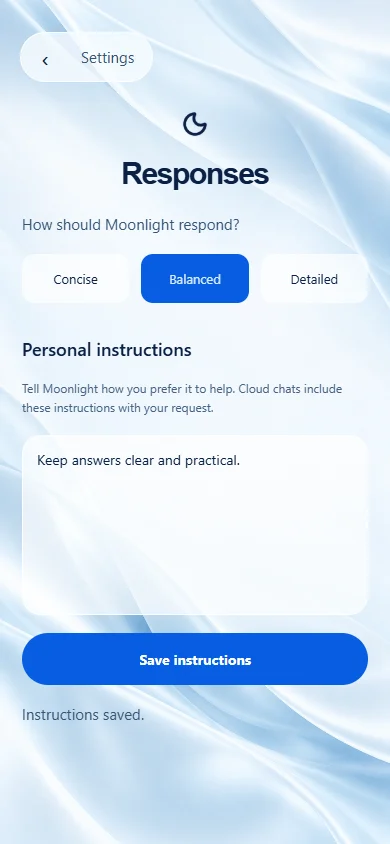
Choose concise, balanced, or detailed response styles and save custom personal instructions.
How it works
Personal instructions apply to conversations and are included in Computer and Cloud requests. Saved memories are not automatically injected into remote requests.
012 / RELEASED
Voice input
Speak your prompt.
Use Android speech recognition to dictate prompts directly into your conversation.
How it works
Uses Android system SpeechRecognizer. Transcripts follow the data path of the selected Phone, Computer, or Cloud mode. Moonlight does not record raw audio.
03 / FIVE WAYS TO FEEL AT HOME
Same Moonlight. A different mood.
Glass, Glass Night, Paper, Mono and Midnight. Choose the light you like, follow your system appearance, or reduce motion. Your preferences stay saved.
A little daylight, wherever you are.
App UI captures · Moonlight AI 1.7.x
02 / A CLOSER LOOK
Feels different. Feels like yours.
Everything, in its place.
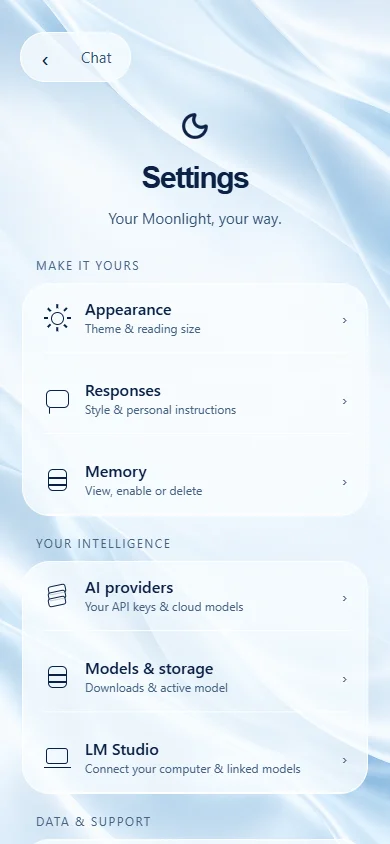
A new glass settings experience brings appearance, responses, models and connections together.
01 / 06
Moonlight AI 1.7.x · Actual app UI captures. Execution follows your selected Phone, Computer, or Cloud mode.